


Introducing Curved Traces in Flux

A smoother way to route high-speed and RF designs—right in your browser.
We’re excited to announce one of the most requested features from advanced users: Curved Traces are now available in Flux!
Whether you’re routing high-speed buses, fine-tuning antennas, or laying out clean RF filters, sharp 90º or even 45º angles can be a serious bottleneck. Now, you can create precisely curved elbows across entire nets—or dial them in trace by trace—with full control over radius, inheritance, and overrides. Curved Traces were built to work the way you already do in Flux. You don’t need to micromanage every elbow—just set your rules once, and let the system handle the rest.
Need to override an elbow? You can. Want to apply curved traces to an entire layout? Go for it. You’re in the driver’s seat, and the system has your back with smart defaults, inheritance, and DRCs that surface only when needed.
This release sets the stage for what’s next: full support for flex and rigid-flex boards. Curved Traces are the first major unlock—and we’re actively building the rest. Flex is on the way.
The power of curved traces
This isn't just about cosmetics. Curved traces improve routing quality, unlock new design styles, and remove a major blocker for:
- Antennas and RF filters where MHz–GHz signals demand smooth, impedance-consistent transitions
- High-speed signals like DDR4 or HDMI that depend on tight length matching.
- Signal integrity-sensitive designs, where tight corners can accumulate charge and distort waveforms
Until now, you had to work around Flux’s sharp elbows. Now, you can design the way the pros do—with full control over every bend.
How to use curved traces in Flux
Curved Traces give you a new level of control over how your signals move across the board—whether you’re designing critical paths or polishing the final layout. To use curved traces:
1. Enable curved routing - Set the Trace Shape rule to "Curve" at the layout, net, or individual segment level. This tells Flux to apply curves instead of sharp elbows wherever possible.
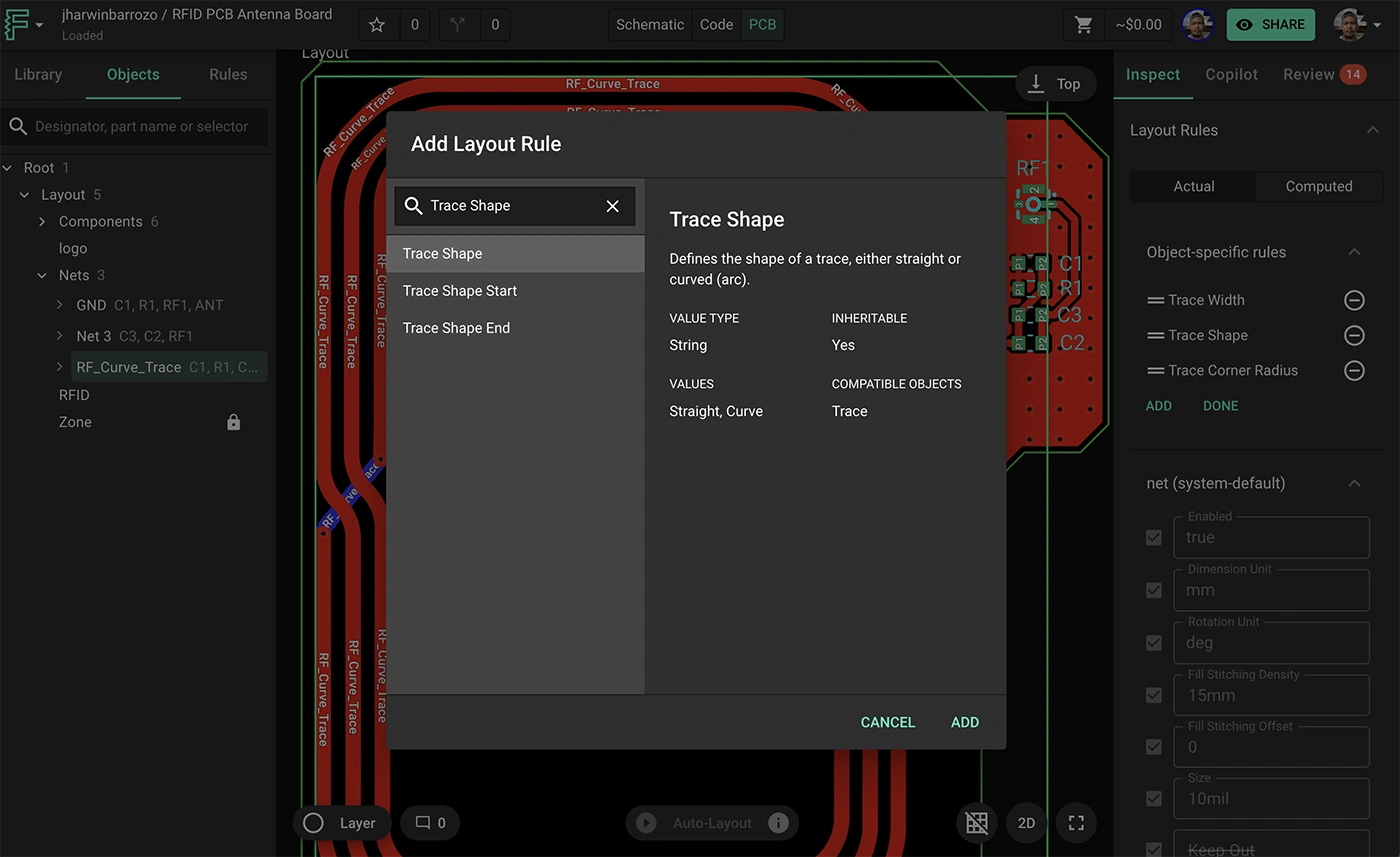
2. Set a minimum radius - Use the Trace Corner Radius Minimum rule to define the smallest allowable curve. This helps ensure manufacturability—especially for tight layouts or impedance-sensitive routes.

3. Leverage inheritance - Apply your rules at the layout or zone level so they cascade automatically. You can mark rules as !important to make them stick when conflicts arise.
4. Override specific elbows - Need more control? Just click and drag the trace elbow or use Trace Corner Radius Start/End or Trace Shape Start/End to adjust a specific corner without affecting the whole trace.
5. Watch for DRC warnings - Flux will flag any elbows that can’t meet your minimum radius—so you can adjust your layout before it becomes a real problem.
6. Mix manual + auto-routing - Route critical traces by hand to maintain control—then auto-route the rest. Flux will respect your curved segments and finish the job cleanly.
If you’ve ever spent time nudging elbows, adjusting angles, or finessing a meander by hand, this is the update you’ve been waiting for.
Real projects. Real curves.
Want to see what’s possible? We’ve put together a few fully forkable example projects that showcase curved trace routing in the wild:
- RFID Antenna Board - High-performance RFID antenna solution built on a PCB configurations

- RF Filter Example – Controlled radii for consistent performance

Open them, explore the layout rules, and make them your own.
This is just the beginning
Curved Traces are a foundational feature—especially for advanced workflows. But they’re also a signal: we’re investing deeply in professional-grade capabilities, from stackups and automatic impedance control to AI auto-layout and AI-assisted design reviews. If Flux wasn’t quite enough for your pro projects before, now’s the time to jump back in.
Curved Traces are available to all users starting today. Just open any project, apply the "Curve" trace shape in your layout rules, and start routing. It's that simple.
Got feedback or something cool to share? Post in the Flux community or tag us—we’d love to feature your work.
Let’s bend some traces.
👉 Open Flux and try it now.
More in PCB Design & Engineering Fundamentals

What Is a PCB? A Beginner's Guide to Printed Circuit Board Design

What is Schematic Design? All You Need to Know

PCB Stackup Design: How to Build the Right Layer Structure

Best PCB Routing Techniques for Clean Circuit Board Layouts

How to Read PCB Schematics: A Beginner-Friendly Guide

PCB Schematic Best Practices for Clean Circuit Design

Schematic Capture Explained: How Engineers Create Circuit Diagrams

Common Schematic Design Mistakes and How to Avoid Them

PCB Netlists Explained: How Schematics Connect to Layouts

What Is a Netlist? Understanding the Basics of Electronic Design Automation

PCB Symbol Design: Best Practices for Clean Schematics

Making Parts Just Got Easier: Introducing Parametric Symbols

Create Satisfying Schematics with these Updates

Electronic Circuit Design Explained: From Schematics to PCB Layout

Designing PCBs: What Are the Essential Steps

Hardware Design Workflow: From Schematic Capture to Manufacturing

What Is a Functional Block Diagram and Why Is It Critical in System Design

PCB Design Basics: What You Need to Know Before You Start

Diode Symbols: How to Identify Common Diodes

Ultra Librarian joins Flux to Take the Hard out of Hardware

Flux Now Has the World's Largest eCAD Part Library

Capacitor Symbols Explained: Types, Polarity, and Schematic Use

MOSFET and Transistor Symbols Explained: NMOS, PMOS, NPN, and PNP

How to Convert PDF Schematics into Editable EDA Files Using AI

Crosstalk, Reflections, and the Real Challenges of Signal Integrity

What Is Signal Integrity in PCB Design? A Practical Guide

High-Speed PCB Design: Layout Rules, Signal Integrity, and Routing Best Practices

EMI/EMC in PCB Design: How to Reduce Interference

PCB EMI Problems: Causes and Solutions

Differential Pair Routing Guidelines and Controlled Impedance Best Practices

PCB Impedance Control: A Practical Guide for Engineers

Analog vs Digital PCB Design: Key Differences Explained

Pi Filters Explained: Design, Components & Applications

RS485 Explained: Wiring, Specifications, and Applications

What is RS232?

SPI vs. I2C: Which Communication Protocol Should You Use?

RJ45 Connectors: Pinouts, Categories, Uses, and Testing

CO2 Sensor Technology: How These Devices Detect Carbon Dioxide

Hall Effect Joysticks: How They Work, Benefits, and Uses

What Is an Oscillator? Beginner's Guide to Oscillating Circuits

Flexible PCB Design Guide: Materials, Layout, and Applications

Rigid-Flex PCB Design: Benefits, Challenges, and Layout Tips

The RF Engineer's Guide to Designing Printed Trace Antennas

SMA Connectors Explained: Types, Applications, and PCB Design Considerations

RC Low-Pass Filter: Formula, Cutoff Frequency & Design

Decoding Voltage Regulators: How They Work in Everyday Electronics

Voltage Regulators: How They Work, Types, and Applications

Buck Converter Design: Components, PCB Layout, and Formulas

Buck and Boost Converters: How They Work and Where They’re Used

LM2596 in Action: Case Study of Its Application in Power Supply Units

Guide to GND Fills and Power Planes

Power Distribution Network (PDN) Design in PCBs

PCB Grounding Techniques for Noise Reduction and Stability

Designing High-Current PCBs: Layout and Safety Considerations

How to Calculate PCB Trace Resistance

Voltage Drop Calculations: Formulas, Factors, and Guidelines

AC to DC Converter: The Backbone of Power Electronics

AC-to-DC Converters: How They Work, Types, and Design Tips

Thermal Management in PCB Design: Methods and Best Practices

PCB Thermal Management: Analysis and Design Best Practices

Understanding PPS Fast Charging: What It Is and How It Works

Decoupling Capacitors in PCB Design: Placement and Selection

What Is a Multilayer Ceramic Capacitor (MLCC)?

Tantalum Capacitors Guide: Polarity, Derating & Risks

Amps vs. Volts: Key Differences and How They Work Together

Never Worry About Stackups Again: Introducing the Stackup Editor

Multilayer PCB Design: Best Practices for Circuit Board Layout

How to Choose PCB Materials: FR4 vs Advanced Substrates

Blind Vias, Buried Vias, and Microvias: A Complete Guide to PCB Via Types

Exploring Different Types of Vias in PCB

High-Density PCBs just got easier with Smart Vias

How to Use Via Stitching in PCB Design

PCB Design Constraints: What Engineers Need to Know

PCB Constraint Management: How Engineers Control Layout Rules

Design Rule Checking (DRC) in PCB Design: Real-Time vs Batch, Rules, and Common Failures

Electrical Rule Check (ERC) vs DRC in PCB Design

PCB Design Reviews: Best Practices for Catching Errors Early

Common PCB Design Mistakes and How to Avoid Them

5 Common PCB Design Mistakes and How to Avoid Them

PCB Silkscreen Design: Guidelines and Common Mistakes

Smart Polygons: Advanced PCB Design Just Got Easier

Automatically Create Photorealistic PCB Renders

How to Convert from MM to Mils: a Guide for Beginners

What Is Solder Mask? Materials, Colors, and PCB Design Rules

Designing Custom PCB Outlines: Fixing DXF and SVG Import Failures

PCB Enclosure Design: How to Design an Enclosure

Component Selection in PCB Design: How Engineers Choose the Right Parts

Smarter Part Search Just Got a Major Upgrade

How to Design a PCB Footprint (Step-by-Step Guide)

Protection Circuit 101: Securing Your Electronics from Overcurrent and Short Circuits

Understanding the Flyback Diode: Your Essential Guide to Functionality and Why You Need One

What Is a Zener Diode? How It Works and Where It’s Used

Understanding the Fundamentals: MOSFET Basics for Beginners

LM741 Pinout: A Deep Dive into a Classic Op Amp

6 Types of Variable Resistors: a Detailed Look at Their Uses
Parallel and Series Resistor Calculator

Resistor Color Code Calculator

SMT vs Through-Hole Technology: Which Should You Use?

How to Use Flux When Soldering Electronics

The Ultimate Guide to Toggle Switches: Types, Uses, and How They Work

What Is the Science Behind Push Button Switches and How They Work

Tactile Switches: Wiring, Debouncing, and PCB Design

Electrical Wire Connector Types and Uses

Why Your PCB Is Failing: Debugging Common Issues

555 Timer Guide: Pinout, Operating Modes, and Circuit Examples

Inverting Op-Amp Circuits: Formula, Gain, and Design Examples

How to Wire a Potentiometer: Pinout, Diagrams, and PCB Examples
Let’s start building.

Let’s build your idea together. All you need to do is describe what you want to make, or what problem you want to solve. Flux will work with you to make it a reality.
