Flux brings circuit simulation to wherever you are in the design process. Start from a prompt when you have no schematic, or let Flux analyze your existing design automatically.
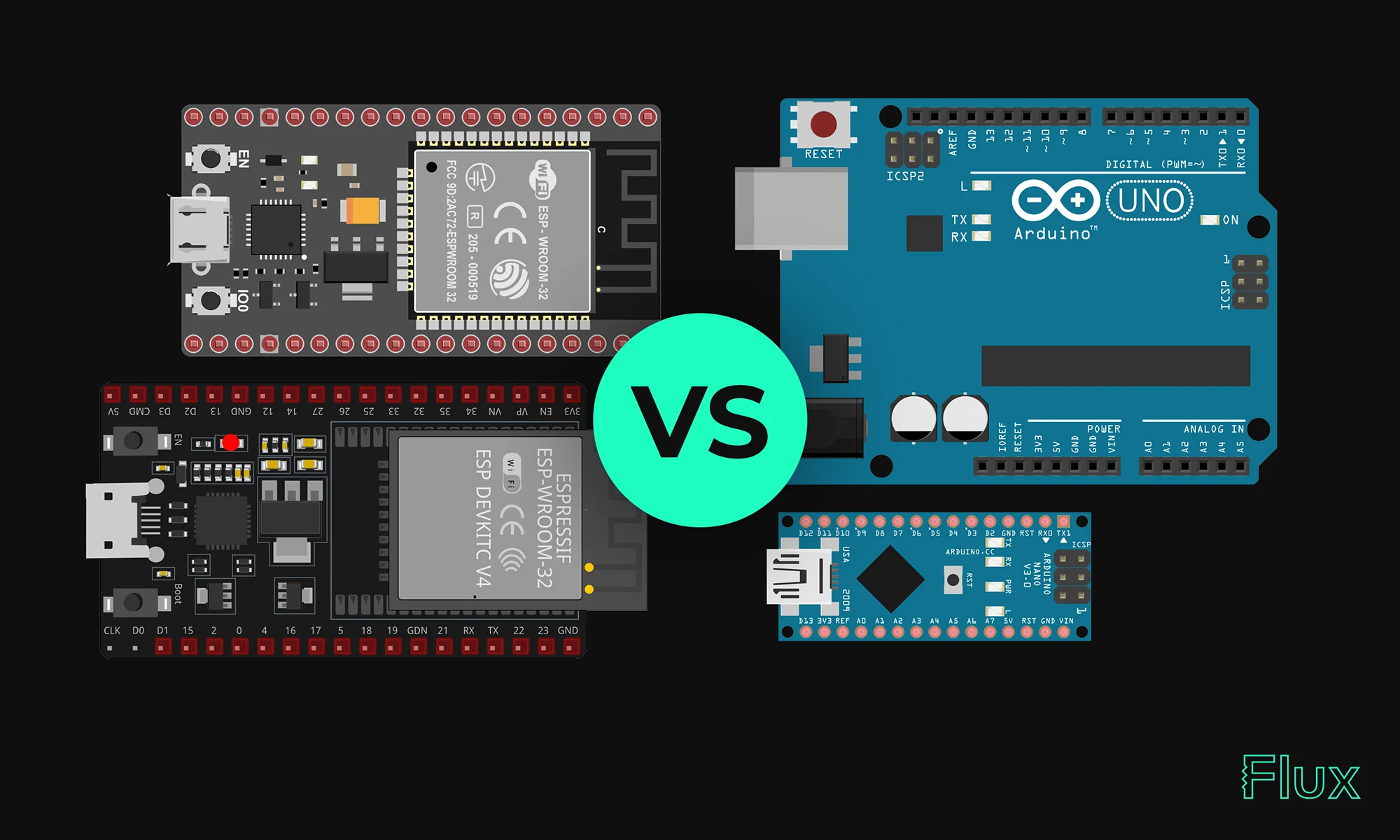
Our 2023 guide compares ESP32 and Arduino, two essential microcontrollers in IoT. ESP32 offers advanced features like Wi-Fi, while Arduino excels in ease of use and community support. Choose based on your project's complexity and needs.
Espressif has designed the ESP32 to come with a dual-core Xtensa LX6 microprocessor, 520KB of SRAM, and various interfaces for peripherals. It also supports Wi-Fi and Bluetooth, allowing seamless connectivity. ESP32 can be programmed using either the Arduino IDE or the ESP-IDF (Espressif IoT Development Framework), which is more complex and might be challenging for beginners. It is the successor of ESP8266 created by the same company, Espressif. ESP32 can be used in the form of a module or NodeMCU.
With higher clock speeds and the ability to perform parallel processing, ESP32 boasts impressive computational power. The availability of numerous GPIO pins and communication interfaces such as SPI, UART, and I2C provides flexibility in interfacing with different sensors and devices. In a way, ESP32 can be thought of as a devkit for connected devices.
If you want more details about the power consumption optimization, please refer to the ESP32 User manual found in Espressif website.
{{insert-project-1-here}}
Arduinos are based on a variety of microcontrollers, with the popular Arduino Uno using an ATmega328 microcontroller. The basic model includes 32KB of flash memory, 2KB of SRAM, and a modest 16MHz clock speed. The microcontrollers used in Arduino products include several GPIOs and common microcontroller communication interfaces like SPI, I2C, and UART.
Arduino boards typically offer lower processing power compared to ESP32 but are often sufficient for many applications. Similar to a devkit, the easy-to-use layout and a range of built-in components make them great for beginners.
When deciding between the ESP32 and Arduino, the answer largely depends on the specific needs and constraints of your project. Here are some factors to consider:
{{insert-project-2-here}}
{{insert-nico-video}}
ESP32's software ecosystem supports various programming languages like C, C++, and Python. The toolchain and SDK provided offer flexibility in development.
Programming the ESP32 may require a steeper learning curve compared to Arduino but offers greater control and efficiency, especially for complex applications.
To program the Arduino's microcontroller, the Arduino IDE is known for its simplicity, supporting C and C++. The wide variety of libraries and community support makes it approachable for newcomers. Arduinos are also compatible with microPython.
Coding in Arduino focuses on accessibility, with an extensive list of example codes and tutorials available. This has helped foster a large and supportive community around the platform.
ESP32 is suitable for advanced projects requiring higher processing capabilities and connectivity, like IoT devices, smart home applications, and industrial automation.
Arduino’s simplicity makes it a preferred choice for educational purposes, art installations, and hobbyist projects.
ESP32 offers advanced features and robust processing, making it suitable for complex applications. Arduino, with its user-friendly approach, is often the go-to for beginners and education. Below is a summary of their strengths and weaknesses.
{{insert-project-3-here}}
All things considered, the choice between ESP32 and Arduino largely depends on the project requirements. For complex, connected applications, ESP32 is the choice, while for simplicity and learning, Arduino is preferred. Understanding the nature of the project and weighing the strengths and weaknesses of each platform is key to making the right decision in 2023.
1. Can I use Arduino IDE to program ESP32?
Yes, ESP32 is compatible with the Arduino IDE, making it easier to program for those familiar with Arduino boards.
2. Which is better for IoT, ESP32 or Arduino?
ESP32 is generally better for IoT due to its built-in Wi-Fi and Bluetooth capabilities.
3. Is ESP32 more powerful than Arduino?
Yes, ESP32 has a dual-core processor, more RAM, and higher clock speeds, making it more powerful than most Arduino boards.
Explore the key aspects of PCB thermal analysis and discover best practices for enhancing your PCB design. Understand how thermal conductivity impacts heat management and overall PCB functionality, leading to more reliable and efficient circuits.
Electric currents generate heat as they pass through resistive elements of a circuit. The higher the resistance of a conductor, the more heat will be generated as current passes through it. Therefore, addressing both electric and thermal parameters in board design is essential for long-term functionality. PCB thermal analysis plays a vital role in the design process, as it can predict thermal flaws and provide an opportunity for circuit redesign. Some key PCB design considerations for improved thermal performance include temperature-sensitive components. Components that are especially sensitive to temperature should be placed in the location with the lowest temperature, such as the bottom of the board.
The simplest way to dissipate heat would be through thermal vias to the cooling system (heat sink or heat pipes). The heat sink draws heat away from the PCB to fins that provide a larger surface area for faster heat dissipation.
Thermal Equivalent Circuits are an analogy of electrical circuits to provide an estimation of the flow of heat in a design. They work because the underlying equations for the transfer of thermal energy and electrical energy are similar enough. With the analogies, we can calculate the heat transfer within the PCB.
Equivalent Equations
I = V1-V2/R => Q = T1-T2/Rt
Where:
I is the current (A)
V is the voltage (V)
R is the electrical resistance
Q is the heat flow (W)
T is the junction temperature (°C)
Rt is the thermal resistance (°C/W)
Similarly, equivalent thermal resistance in series and parallel also follows the same equations for electrical resistance.
Thermal impedance measures the sum of thermal resistance and thermal contact resistance of a material. This value can be found in the component datasheet for integrated circuits and ranges from 20 °C/W for low-power amplifiers or ICs, to as high as ~200 °C/W for powerful microprocessors. The operating temperature can be determined by multiplying the component’s power consumption by its thermal impedance.
T = Z*P
Where:
T is the component temperature (°C).
P is the power usage of the component (W)
Z is the thermal impedance (°C/W)
When your PCB generates significant heat, choosing a substrate with superior thermal conductivity is crucial. Ceramics are an excellent option due to their high thermal conductivity and adjustable mechanical properties, which help manage mechanical stress during thermal cycling. Adding a metal core to the board or increasing copper below components, such as adding a plane layer, can also enhance heat dissipation.
When designing PCBs, the importance of effective thermal management cannot be overstated. High-power components generate significant heat, and without proper dissipation, the performance and longevity of the circuit boards can be compromised. One effective method to manage this heat is by using a heat sink. A heat sink helps to draw heat away from critical components, improving the overall thermal performance of the PCB.
Thermal relief is also design feature used in electronic circuit boards to manage heat dissipation from components that generate significant heat during operation. It helps to prevent overheating and ensures the reliability and longevity of the components.

There are two main configurations for thermal relief:
PCBs are the backbone of modern electronics, and ensuring they operate within safe thermal limits is crucial. Circuit boards that overheat can lead to component failure and reduced reliability. This is why thermal resistance and thermal impedance are important parameters to consider in PCB design. By carefully selecting materials and employing efficient cooling techniques, such as integrating cooling fans, the thermal performance of PCBs can be significantly enhanced.
PCB thermal simulation enables designers to predict thermal management issues, ensuring optimal heat dissipation. By simulating different layouts and thermal solutions, designers can avoid costly physical iterations and achieve a thermally efficient design from the outset.
Thermally conductive materials, such as certain ceramics, can greatly improve the heat dissipation capabilities of circuit boards. Additionally, incorporating thermal vias and using thermally conductive paste can further aid in managing the heat generated by high-power components. Cooling fans are another essential element in thermal management, ensuring that heat is effectively removed from the PCB and dissipated into the surrounding environment.
PCB design requires careful consideration of thermal management techniques. By utilizing heat sinks, thermally conductive materials, and cooling fans, designers can create circuit boards that operate efficiently and reliably, even under demanding conditions. Proper thermal analysis and simulation are key to achieving optimal performance and preventing overheating issues in PCBs.

This blog post explores the RS485 communication standard, renowned for its ability to facilitate long-distance, multidrop networking with enhanced noise immunity, making it a preferred choice for industrial settings. Dive into the post to understand RS485's key features and advantages over older protocols.
RS485 is engineered to overcome the limitations inherent in older serial communication standards, such as RS232 and RS422. RS485's facilitates communication between more than two devices, a feature central to the concept of multidrop networking.
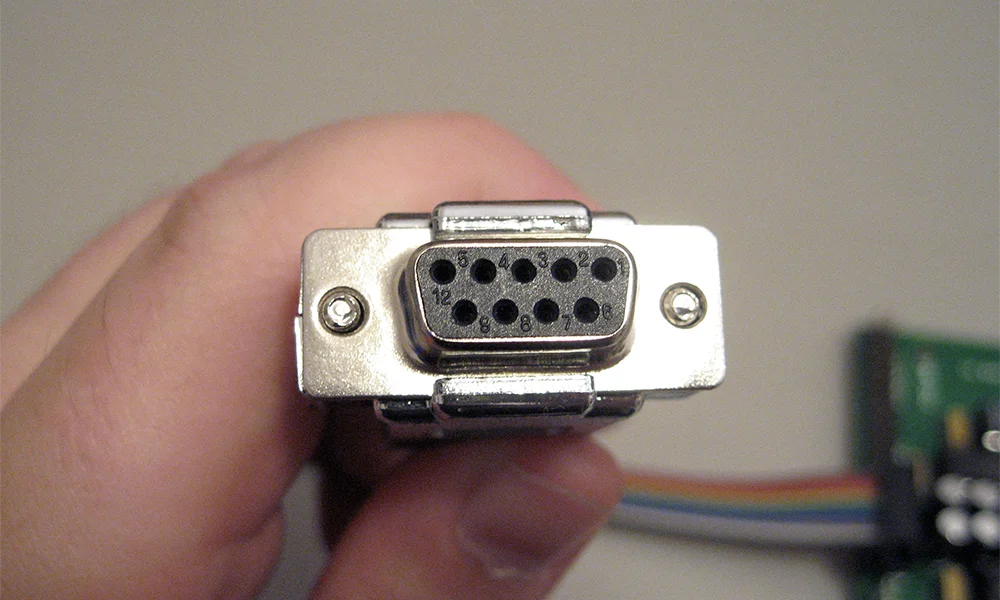
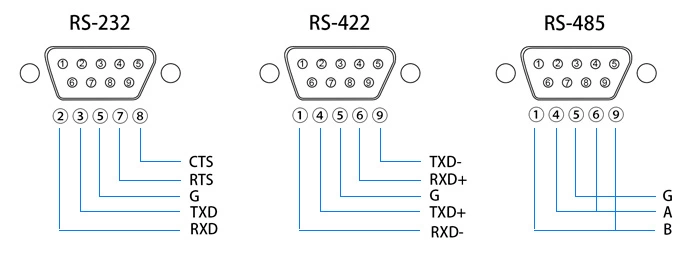
RS232 and RS422 are two other major serial communication protocols. While RS232 is limited in distance and device connectivity, offering point-to-point communication typically within 50 feet, RS485 extends this capability to 4000 feet and allows up to 32 devices on a single bus. RS422, similar to RS485 in terms of distance and voltage levels, differs primarily in its support for multi-drop configurations. RS422 is more suited for point-to-point or multipoint unidirectional communication, lacking the bidirectional, multi-drop capability inherent to RS485.
RS485 is the physical layer for several industrial protocols.
While RS485 inherently supports digital communication, it is often used in conjunction with analog-to-digital converters (ADCs) and digital-to-analog converters (DACs) to interface with analog sensors and control devices. This is useful when analog signals from sensors (like temperature, pressure, or flow sensors) need to be digitized for processing and monitoring in digital control systems.
Proper termination of the RS485 network is essential to prevent signal reflections, which can degrade communication quality. This involves matching the characteristic impedance of the cable with terminating resistors at each end of the network.
Cable selection and layout are also critical. Factors such as the type of twisted pair cable (shielded or unshielded), the environment where the cable is installed (including potential exposure to EMI), and adherence to proper grounding practices are critical for optimal network performance.
Maintenance of RS485 networks involves regular checks for any deterioration in cable integrity, connectors, and terminations. Additionally, Ensuring network reliability involves managing device limits and adhering to cable length specifications.

Despite newer technologies like USB and Ethernet, RS232 remains widely used due to its simplicity and broad compatibility. It's crucial in industries, scientific instruments, networking gear, and legacy computers. This protocol's reliability makes it the go-to for many applications. In this blog, we'll explore why RS232 continues to be relevant in our tech-savvy world.
Physical Characteristics of Connector Types (DB9, DB25)
The RS232 standard utilizes two primary types of connectors: DB9 and DB25.
Each connector type serves a specific application–modern, smaller applications or complex setups that need more control, respectively–with different pin configurations for transmitting data, receiving data, and various control signals.

Pinouts in RS232 connectors define the functionality of each pin. These configurations vary between DB9 and DB25 connectors. The standard pinouts include pins designated for Transmit Data (TXD), Receive Data (RXD), and several control signals like Request to Send (RTS) and Data Terminal Ready (DTR).
DB9 Pinout for RS232 Communication:
Despite the advent of more advanced communication protocols like USB and Ethernet, RS232 remains used due to its simplicity and wide compatibility. It's commonly used in industrial and scientific instruments, networking equipment, and legacy computer systems.
Common issues in RS232 communication include misconfigured baud rates, incorrect parity settings, and improper cable connections. Troubleshooting these problems requires a systematic approach, often involving checking cable connections, verifying device configurations, and using diagnostic tools like serial port monitors.

A voltage drop calculator is an essential tool for assessing the decrease in voltage across a conductor, ensuring electrical devices receive adequate power for optimal operation. Read our blog to learn more.
Voltage drop in electrical circuits can lead to various issues, affecting the performance and lifespan of electrical equipment:
Here's a table summarizing the NEC guidelines on voltage drop:
Voltage drop calculators typically require you to input the following parameters:
The calculator then computes the voltage drop based on the inputs and provides the result in volts or as a percentage of the initial voltage. Some calculators also provide the minimum conductor size required to limit the voltage drop to a specified level.
Voltage drop of the circuit conductors can be determined by multiplying the current of the circuit by the total resistance of the circuit conductors: The Ohm’s law (V = I*R) method only applies for DC current and cannot be used for three-phase circuits.
Transforming the formula, we have:
V = 2*R*I*L
Where:
Generally, with the cable information (length, size, material, operating temperature, and cover type), we can find its resistance and inductance from the reference tables. Three-phase AC power, with three sine waves offset by 120 degrees, is used in industrial and commercial settings for more efficient power distribution and to run heavy machinery.
V=3*I*L*(R*cosθ+X*sinθ)
For balanced three-phase circuits, a simplified calculation is:
V =3*I*Z*L/1000
Where:
The significance of calculating voltage drop extends beyond basic electrical design; it's a key factor in the overall performance and safety of electrical systems. Excessive voltage drop is a common culprit behind inefficient system performance, equipment malfunctions, and even safety hazards, which can lead to costly repairs and downtime. Furthermore, meeting the stipulations of electrical codes and standards, which dictate maximum allowable voltage drop levels, is non-negotiable for electrical professionals. Ensuring devices operate within these guidelines means that voltage drop calculations are not just a matter of efficiency but of compliance and safety as well.

This blog will explore functional block diagrams, their pivotal role in system design, the symbiotic relationship with ladder logic, structured text, and the broader realm of PLC programming. Why FBDs are so important within complex systems.
A functional block diagram is a schematic representation that delineates the principal functions of a system and the flow of data between them. It serves as a cornerstone in system engineering, simplifying the visualization of complex interactions within systems. FBDs are characterized by their use of labeled blocks connected by lines indicating dataflow, making them an intuitive means for depicting system operations.
The advantages of function block diagrams are that they’re very easy to follow and understand. They are generally laid out to mimic a specific process thus making it easy to understand for those who don’t have a background in plc programming.
In essence, an FBD breaks down large systems into manageable, functionally discrete blocks, facilitating a modular approach to system design. This modularity is crucial, allowing designers to focus on individual functions without being overwhelmed by the system's overall complexity.
The potency of a functional block diagram lies in its simplicity and clarity, achieved through three fundamental components:
FBDs do not exist in isolation; they are part of a larger ecosystem of programming languages and representation techniques used in the programming of programmable logic controllers (PLCs). Ladder logic, with its origins in electrical wiring diagrams, offers a graphical method that is intuitive for those with a background in electrical engineering. It depicts control logic in a format resembling a ladder, with rungs representing logical operations.
Structured text, another facet of PLC programming, is a high-level textual programming language that resembles traditional computer programming languages. It allows for complex instructions and algorithms to be implemented in a more familiar syntactic form.
FBDs complement these programming paradigms by providing a visual overview of system logic and dataflow, serving as a bridge between the conceptual design and the detailed implementation in ladder logic or structured text. This synergy enhances the understandability, development efficiency, and maintainability of PLC-based systems.
PLCs stand at the forefront of industrial automation, controlling machinery and processes with precision and reliability. In the domain of PLC programming, FBDs play a pivotal role, offering a graphical method for designing and implementing control logic.

FBDs align perfectly with the operational paradigm of PLCs, which are inherently designed to execute logic operations based on real-time data inputs. The visual nature of FBDs facilitates the rapid development and troubleshooting of PLC programs, enabling engineers to map out complex control strategies in a more intuitive and less error-prone manner.
Moreover, the adoption of FBDs in PLC programming underscores the importance of a clear and structured approach to system design. By visualizing the functional architecture of a system, engineers can ensure that all components interact harmoniously, leading to more robust and reliable PLC-based control systems.
As system complexity continues to escalate, the role of functional block diagrams in system design is not only preserved but also expanding. The integration of FBDs with advanced simulation tools and software development environments is enhancing their utility, allowing for more dynamic and interactive system modeling.
The future of FBDs is likely to witness further integration with artificial intelligence and machine learning technologies, enabling smarter and more adaptive systems. As these advanced systems become more prevalent, the clarity and efficiency offered by FBDs will become even more critical in navigating the complexity of modern system design.
Functional block diagrams are a testament to the power of visual representation in the realm of system design. By distilling complex system functionalities into comprehensible blocks and illustrating the dataflow dynamics, FBDs provide a foundation for designing, implementing, and maintaining sophisticated systems. Their symbiotic relationship with ladder logic, structured text, and PLC programming languages enhances their utility, making them an indispensable tool in the engineer's toolkit.