


Design with Real-Time Supply Chain Visibility

Your design is finally finished. The schematic is clean, the layout is complete, and you're ready to order parts. Then a key component comes back as backordered, unavailable, or far more expensive than expected. What looked like a stable design suddenly requires substitutions, rework, or tradeoffs—changes that ripple back through layout, validation, and mechanical constraints.
This happens because most EDA tools treat sourcing as an afterthought. Parts are selected early, a BOM is generated, and supply conditions are only checked once the design is locked. When availability or pricing shifts, the BOM becomes brittle, and changes become expensive.
Flux takes a different approach. Instead of treating pricing and availability as a post-design concern, Flux keeps live supply data connected to your project as you work. Your project becomes a living document that stays aligned with the supply chain, surfacing constraints early—when decisions are still flexible and changes are cheap.
See pricing and availability in part search
When you browse and select parts in the part library, Flux shows pricing and availability so you can spot sourcing constraints early. The Part Library panel is collapsed by default—expand it to see full pricing and availability details. You can also filter by stock status using the cart icon to show only available components.

To expand the part library panel, hover your mouse at the leftmost edge and drag it to the left.
Ask AI to find in-stock parts
Ask Flux AI to find parts that are in stock—it searches real-time supply chain data and understands your full project context. Instead of manually checking distributor websites, you get parts from the library that match your requirements and constraints.
Example prompt:
"I need a 16-bit ADC with at least 1 MSPS sampling rate for a battery monitoring application. Find what’s available within 2 weeks?"

Ask AI to find replacements quickly
Ask Flux AI to find a replacement that's in stock. It understands your full project context, including what the part connects to, how you're using it, and your design requirements and constraints, and suggests parts with similar packages and specifications.
It prioritizes availability over minor price differences and recommends parts already in the library, so you don't have to build them from scratch. Once you select a replacement, Flux AI can automatically drop it onto the canvas and wire it up for you.
Example prompt:
"Can you find me a cheaper replacement for U2?"

Check real-time distributor stock for any part
To check availability for a part, click on it in your design to open the inspector panel on the right. Scroll to the bottom, and you'll see real-time stock levels across multiple distributors—Arrow, Mouser, DigiKey, LCSC, Verical, and TME. This gives you a clear picture of whether a part is widely available or at risk of supply chain issues. If the part isn't in Flux's library, the system can search the broader internet to find availability data.
Note: You'll need a manufacturer part number (MPN) defined in the MPN property for generic parts.
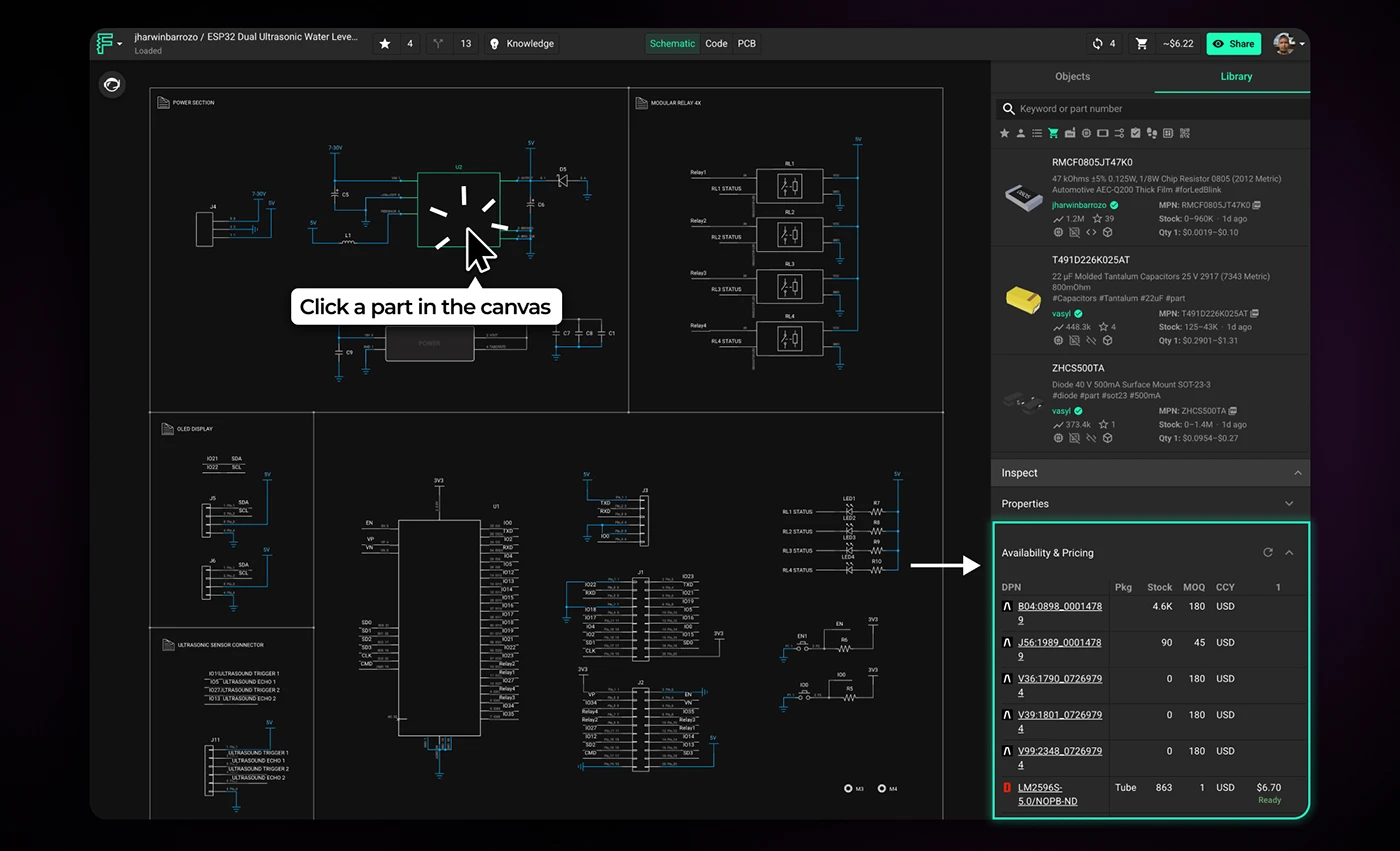
Click on a part to pull up real-time availability at the bottom of the inspector.
Design with the supply chain in mind
Supply chain constraints don't go away once you've finalized your design—they just become more expensive to fix. The earlier you catch them, the more options you have.
Start treating sourcing as a design constraint, not a procurement problem. Check availability when you select parts. Let Flux AI flag risky components before you commit to a layout. And when something goes out of stock, find alternatives while you still have room to adjust.
The tools are already in your workflow. Use them before the BOM forces your hand.
More in Hardware 101 Development

Hardware Feasibility: Cost Engineering and Part Selection

How to Choose the Right Architecture for Robotics, Wearables & IoT

Hardware Prototyping: From Concept to a Tested PCB

Hardware Team Collaboration: ECAD, MCAD & Firmware Workflows

Designing for Compliance: PCB Layout Tips for EMI & FCC/CE Testing

Design for Manufacturing: How to Move from Prototype to Production

Electronic Component Sourcing: Lead Times & Component Lifecycles

Is Your Hardware Startup Idea Worth Building?

What Is a Functional Block Diagram and Why Is It Critical in System Design

Hardware Design Workflow: From Schematic Capture to Manufacturing

Choosing the Right Platform to Build Your Project

PCB Design Reviews: Best Practices for Catching Errors Early

PCB Prototyping vs. Fabrication: Which Process Is Right for Your Project?

Collaborative PCB Design: Why Hardware Teams Are Moving to the Cloud

AI Gives You the Power of an Entire Supply-Chain Team

PCB Manufacturing Process Explained Step-by-Step

Discovering PCB Manufacturing: Technologies That Shape the Industry

PCB Cost Optimization: How to Reduce Manufacturing Costs

5 Common Mistakes Working with PCB Contractors
Let’s start building.

Let’s build your idea together. All you need to do is describe what you want to make, or what problem you want to solve. Flux will work with you to make it a reality.
