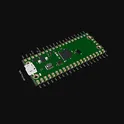
Raspberry Pi Schematics
A Raspberry Pi is a small, affordable, and versatile computer that can be used for a variety of purposes. It has a range of use cases, including: 1. Home media center: The Raspberry Pi can be used to build a home media center, allowing you to stream movies, music, and TV shows to your TV. 2. Desktop computer: With the right accessories, the Raspberry Pi can be used as a desktop computer for everyday tasks such as browsing the internet, creating documents, and playing games. 3. Learning to code: The Raspberry Pi is a great tool for learning to code, with a range of free resources and tutorials available online. 4. Internet of Things (IoT) projects: The Raspberry Pi can be used to build Internet of Things (IoT) projects, such as a smart home system or a weather station. If you're interested in using a Raspberry Pi for your next project, be sure to check out flux.ai, the world's largest community-driven public library of Raspberry Pi footprints, symbols, datasheets, and simulation models. With such a wide range of resources available, you'll have everything you need to get started on your next project.
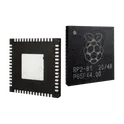
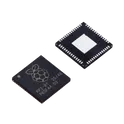
RP2040
Raspberry Pi RP2040 dual-core Arm Cortex-M0+ microcontroller, running up to 133MHz, with 264KB on-chip SRAM, external QSPI flash support, USB 1.1 device/host controller, 30 GPIO pins, UART, SPI, I2C, PWM, ADC, timers and programmable I/O (PIO) blocks, 1.8V to 3.3V I/O support, low-cost MCU for embedded systems, development boards, IoT devices, USB peripherals, sensors and educational electronics. Search Keywords: RP2040, Raspberry Pi RP2040, RP2040 microcontroller, dual core Cortex-M0+ MCU, Raspberry Pi Pico MCU, RP2040 PIO, RP2040 USB microcontroller, RP2040 QSPI flash, RP2040 datasheet, RP2040 embedded MCU Hashtags: #RP2040 #RaspberryPiRP2040 #RaspberryPiPico #Microcontroller #CortexM0Plus RP2040 chip for Raspberry Pi Pico - ARM® Cortex®-M0+ MCU 32-Bit
2 Uses0 StarsRP2040
133MHz LQFN-56(7x7) Microcontrollers (MCU/MPU/SOC) ROHS RP2040 The RP2040 is a high-performance, low-cost 32-bit microcontroller developed by Raspberry Pi Ltd.. It features dual ARM Cortex-M0+ processor cores, flexible digital interfaces, and a unique Programmable I/O (PIO) subsystem that enables custom hardware protocols and timing-critical applications. The device is widely used in embedded systems, IoT devices, robotics, industrial control, consumer electronics, and educational projects. Key Features Dual ARM Cortex-M0+ CPU cores operating up to 133 MHz (up to 200 MHz under specific conditions) 264 KB on-chip SRAM organized in six independent memory banks External QSPI Flash interface with Execute-In-Place (XIP) support and up to 16 MB Flash memory capability 30 multifunction GPIO pins with extensive peripheral multiplexing 2 × UART interfaces 2 × SPI controllers 2 × I²C controllers 16 PWM channels for motor control and signal generation USB 1.1 Host and Device support with integrated PHY 12-bit ADC with four external analog inputs and internal temperature sensor, up to 500 ksps sampling rate 12-channel DMA controller for efficient data transfers Programmable I/O (PIO) subsystem with 8 state machines for implementing custom communication interfaces and precise timing applications Integrated PLLs and programmable LDO regulator for clock and power management Operating voltage range: 1.8 V to 3.3 V Available in a compact 7 mm × 7 mm QFN-56 package Typical Applications IoT and connected devices Industrial automation Robotics and motor control Human-machine interfaces (HMI) Consumer electronics USB peripherals Sensor data acquisition systems Educational and maker projects Custom communication protocol implementations using PIO #CommonPartsLibrary #IntegratedCircuit #Microcontroller
161 Uses0 StarsRaspberry Pi Pico | End-to-end AI Design Tutorial [Example]
Learn how to design PCBs faster with generative AI in this 20 minute hands-on tutorial. You’ll learn how to use Flux Copilot, an AI-powered hardware design assistant, to research parts, review your design, and even connect components. https://youtu.be/FL7e0OXTLic
0 Uses0 StarsRaspberry Pi Pico 2 Shield Template pyJr
This is the project template for the Raspberry Pi Pico 2, the latest addition and update to Pi Pico line up. Raspberry pi pico 2 is equipped with the RP2350, a cutting-edge, high-performance microcontroller designed with enhanced security and versatility in mind. Every element of its design has been upgraded, from the advanced CPU cores to the innovative PIO (Programmable I/O) interfacing subsystem. The Raspberry Pi Foundation has integrated a robust security architecture centered around Arm TrustZone for Cortex-M, ensuring data protection and integrity. Additionally, new low-power states and expanded package options broaden the range of applications, making the Pico 2 an ideal choice for diverse, power-sensitive projects. To learn more about what's the key differences between the original Pi Pico and the new Pi Pico 2, read our blog https://www.flux.ai/p/blog/whats-new-in-the-raspberry-pi-pico-2-a-showdown-with-the-original-raspberry-pi-pico #project-template #template #raspberry #pi #pico2 #newpico
0 Uses0 StarsRaspberry Pi Pico 2 Shield Template ba33
This is the project template for the Raspberry Pi Pico 2, the latest addition and update to Pi Pico line up. Raspberry pi pico 2 is equipped with the RP2350, a cutting-edge, high-performance microcontroller designed with enhanced security and versatility in mind. Every element of its design has been upgraded, from the advanced CPU cores to the innovative PIO (Programmable I/O) interfacing subsystem. The Raspberry Pi Foundation has integrated a robust security architecture centered around Arm TrustZone for Cortex-M, ensuring data protection and integrity. Additionally, new low-power states and expanded package options broaden the range of applications, making the Pico 2 an ideal choice for diverse, power-sensitive projects. To learn more about what's the key differences between the original Pi Pico and the new Pi Pico 2, read our blog https://www.flux.ai/p/blog/whats-new-in-the-raspberry-pi-pico-2-a-showdown-with-the-original-raspberry-pi-pico #project-template #template #raspberry #pi #pico2 #newpico
0 Uses0 StarsRaspberry Pi Pico 2 Shield Template gUit
This is the project template for the Raspberry Pi Pico 2, the latest addition and update to Pi Pico line up. Raspberry pi pico 2 is equipped with the RP2350, a cutting-edge, high-performance microcontroller designed with enhanced security and versatility in mind. Every element of its design has been upgraded, from the advanced CPU cores to the innovative PIO (Programmable I/O) interfacing subsystem. The Raspberry Pi Foundation has integrated a robust security architecture centered around Arm TrustZone for Cortex-M, ensuring data protection and integrity. Additionally, new low-power states and expanded package options broaden the range of applications, making the Pico 2 an ideal choice for diverse, power-sensitive projects. To learn more about what's the key differences between the original Pi Pico and the new Pi Pico 2, read our blog https://www.flux.ai/p/blog/whats-new-in-the-raspberry-pi-pico-2-a-showdown-with-the-original-raspberry-pi-pico #project-template #template #raspberry #pi #pico2 #newpico
0 Uses0 StarsRaspberry Pi Pico 2 Shield Template 97d1
This is the project template for the Raspberry Pi Pico 2, the latest addition and update to Pi Pico line up. Raspberry pi pico 2 is equipped with the RP2350, a cutting-edge, high-performance microcontroller designed with enhanced security and versatility in mind. Every element of its design has been upgraded, from the advanced CPU cores to the innovative PIO (Programmable I/O) interfacing subsystem. The Raspberry Pi Foundation has integrated a robust security architecture centered around Arm TrustZone for Cortex-M, ensuring data protection and integrity. Additionally, new low-power states and expanded package options broaden the range of applications, making the Pico 2 an ideal choice for diverse, power-sensitive projects. To learn more about what's the key differences between the original Pi Pico and the new Pi Pico 2, read our blog https://www.flux.ai/p/blog/whats-new-in-the-raspberry-pi-pico-2-a-showdown-with-the-original-raspberry-pi-pico #project-template #template #raspberry #pi #pico2 #newpico
0 Uses0 StarsRaspberry Pi Pico 2 Shield Template ojGM
This is the project template for the Raspberry Pi Pico 2, the latest addition and update to Pi Pico line up. Raspberry pi pico 2 is equipped with the RP2350, a cutting-edge, high-performance microcontroller designed with enhanced security and versatility in mind. Every element of its design has been upgraded, from the advanced CPU cores to the innovative PIO (Programmable I/O) interfacing subsystem. The Raspberry Pi Foundation has integrated a robust security architecture centered around Arm TrustZone for Cortex-M, ensuring data protection and integrity. Additionally, new low-power states and expanded package options broaden the range of applications, making the Pico 2 an ideal choice for diverse, power-sensitive projects. To learn more about what's the key differences between the original Pi Pico and the new Pi Pico 2, read our blog https://www.flux.ai/p/blog/whats-new-in-the-raspberry-pi-pico-2-a-showdown-with-the-original-raspberry-pi-pico #project-template #template #raspberry #pi #pico2 #newpico
0 Uses0 StarsRaspberry Pi Pico 2 Shield Template pKgK
This is the project template for the Raspberry Pi Pico 2, the latest addition and update to Pi Pico line up. Raspberry pi pico 2 is equipped with the RP2350, a cutting-edge, high-performance microcontroller designed with enhanced security and versatility in mind. Every element of its design has been upgraded, from the advanced CPU cores to the innovative PIO (Programmable I/O) interfacing subsystem. The Raspberry Pi Foundation has integrated a robust security architecture centered around Arm TrustZone for Cortex-M, ensuring data protection and integrity. Additionally, new low-power states and expanded package options broaden the range of applications, making the Pico 2 an ideal choice for diverse, power-sensitive projects. To learn more about what's the key differences between the original Pi Pico and the new Pi Pico 2, read our blog https://www.flux.ai/p/blog/whats-new-in-the-raspberry-pi-pico-2-a-showdown-with-the-original-raspberry-pi-pico #project-template #template #raspberry #pi #pico2 #newpico
0 Uses0 StarsRaspberry Pi Pico 2 Shield Template rajY
This is the project template for the Raspberry Pi Pico 2, the latest addition and update to Pi Pico line up. Raspberry pi pico 2 is equipped with the RP2350, a cutting-edge, high-performance microcontroller designed with enhanced security and versatility in mind. Every element of its design has been upgraded, from the advanced CPU cores to the innovative PIO (Programmable I/O) interfacing subsystem. The Raspberry Pi Foundation has integrated a robust security architecture centered around Arm TrustZone for Cortex-M, ensuring data protection and integrity. Additionally, new low-power states and expanded package options broaden the range of applications, making the Pico 2 an ideal choice for diverse, power-sensitive projects. To learn more about what's the key differences between the original Pi Pico and the new Pi Pico 2, read our blog https://www.flux.ai/p/blog/whats-new-in-the-raspberry-pi-pico-2-a-showdown-with-the-original-raspberry-pi-pico #project-template #template #raspberry #pi #pico2 #newpico
0 Uses0 StarsRaspberry Pi Pico 2 Shield Template rTNG
This is the project template for the Raspberry Pi Pico 2, the latest addition and update to Pi Pico line up. Raspberry pi pico 2 is equipped with the RP2350, a cutting-edge, high-performance microcontroller designed with enhanced security and versatility in mind. Every element of its design has been upgraded, from the advanced CPU cores to the innovative PIO (Programmable I/O) interfacing subsystem. The Raspberry Pi Foundation has integrated a robust security architecture centered around Arm TrustZone for Cortex-M, ensuring data protection and integrity. Additionally, new low-power states and expanded package options broaden the range of applications, making the Pico 2 an ideal choice for diverse, power-sensitive projects. To learn more about what's the key differences between the original Pi Pico and the new Pi Pico 2, read our blog https://www.flux.ai/p/blog/whats-new-in-the-raspberry-pi-pico-2-a-showdown-with-the-original-raspberry-pi-pico #project-template #template #raspberry #pi #pico2 #newpico
0 Uses0 StarsRaspberry Pi Pico 2 Shield Template aSvn
This is the project template for the Raspberry Pi Pico 2, the latest addition and update to Pi Pico line up. Raspberry pi pico 2 is equipped with the RP2350, a cutting-edge, high-performance microcontroller designed with enhanced security and versatility in mind. Every element of its design has been upgraded, from the advanced CPU cores to the innovative PIO (Programmable I/O) interfacing subsystem. The Raspberry Pi Foundation has integrated a robust security architecture centered around Arm TrustZone for Cortex-M, ensuring data protection and integrity. Additionally, new low-power states and expanded package options broaden the range of applications, making the Pico 2 an ideal choice for diverse, power-sensitive projects. To learn more about what's the key differences between the original Pi Pico and the new Pi Pico 2, read our blog https://www.flux.ai/p/blog/whats-new-in-the-raspberry-pi-pico-2-a-showdown-with-the-original-raspberry-pi-pico #project-template #template #raspberry #pi #pico2 #newpico
0 Uses0 StarsRaspberry Pi Pico 2 Shield Template bUFu
This is the project template for the Raspberry Pi Pico 2, the latest addition and update to Pi Pico line up. Raspberry pi pico 2 is equipped with the RP2350, a cutting-edge, high-performance microcontroller designed with enhanced security and versatility in mind. Every element of its design has been upgraded, from the advanced CPU cores to the innovative PIO (Programmable I/O) interfacing subsystem. The Raspberry Pi Foundation has integrated a robust security architecture centered around Arm TrustZone for Cortex-M, ensuring data protection and integrity. Additionally, new low-power states and expanded package options broaden the range of applications, making the Pico 2 an ideal choice for diverse, power-sensitive projects. To learn more about what's the key differences between the original Pi Pico and the new Pi Pico 2, read our blog https://www.flux.ai/p/blog/whats-new-in-the-raspberry-pi-pico-2-a-showdown-with-the-original-raspberry-pi-pico #project-template #template #raspberry #pi #pico2 #newpico
0 Uses0 StarsRaspberry Pi Pico 2 Shield Template scXR
This is the project template for the Raspberry Pi Pico 2, the latest addition and update to Pi Pico line up. Raspberry pi pico 2 is equipped with the RP2350, a cutting-edge, high-performance microcontroller designed with enhanced security and versatility in mind. Every element of its design has been upgraded, from the advanced CPU cores to the innovative PIO (Programmable I/O) interfacing subsystem. The Raspberry Pi Foundation has integrated a robust security architecture centered around Arm TrustZone for Cortex-M, ensuring data protection and integrity. Additionally, new low-power states and expanded package options broaden the range of applications, making the Pico 2 an ideal choice for diverse, power-sensitive projects. To learn more about what's the key differences between the original Pi Pico and the new Pi Pico 2, read our blog https://www.flux.ai/p/blog/whats-new-in-the-raspberry-pi-pico-2-a-showdown-with-the-original-raspberry-pi-pico #project-template #template #raspberry #pi #pico2 #newpico
0 Uses0 Stars
![Raspberry Pi Pico | End-to-end AI Design Tutorial [Example]](https://img-cdn.flux.ai/eyJidWNrZXQiOiJncmF2aXRvbi1lbGVjdHJpYy1zeW1ib2xzIiwia2V5IjoiZG9jdW1lbnRfYXNzZXRzL1RodW1ibmFpbC1ScGljby0tMS0tM2QwMGFjNzYtZjEzNi00YTkzLWJjYTEtYTlkZjc0ZGI0NmE3LnBuZyIsImVkaXRzIjp7InJlc2l6ZSI6eyJ3aWR0aCI6MTI0LCJoZWlnaHQiOjEyNCwiZml0IjoiY29udGFpbiIsImJhY2tncm91bmQiOnsiciI6MCwiZyI6MCwiYiI6MCwiYWxwaGEiOjB9fX0sIm91dHB1dEZvcm1hdCI6IndlYnAifQ==)